Currently Browsing: How to Blog
Posted by Managementguru in How to Blog, Marketing, Social Media
on Feb 3rd, 2023 | 0 comments

Are you looking for an easy and free way to create engaging social media posts? Look no further! In this blog post, we will provide a list of the best free design apps that you can use to create visually appealing posts that are sure to draw in your followers. Photo by Merakist on Unsplash Whether you’re a beginner or a pro, these design apps will have you creating stunning social media posts in no time! Adobe Express Adobe Express is an amazing design app perfect for creating engaging social media posts. It is a free mobile app designed for creating beautiful, shareable images with ease. It comes with built-in filters and effects, as well as different design elements that you can use to personalize your images. With Adobe Express, you can turn your photos into stunning art pieces in just a few taps. It also offers several templates to help you create unique posts faster. Moreover, it has integration with Adobe Creative Cloud, so you can access your work across multiple devices and share your creations with ease. Adobe Express is the perfect choice for anyone looking to create stunning social media posts quickly and easily. Snappa Snappa is a powerful design app specifically made for creating engaging social media posts. It’s easy to use and offers a wide range of features that will help you create visually appealing posts quickly. It’s an ideal tool for content creators and marketers alike. The intuitive drag-and-drop interface allows users to customize their posts with stunning visuals, eye-catching fonts, and vibrant colors. Snappa also offers access to thousands of pre-made designs, backgrounds, and templates that make designing posts much easier. Plus, users can upload their own images or graphics for a more personalized look. Snappa has some great features that make it a great choice for creating engaging social media posts. It comes with built-in image cropping, resizing and optimization tools, making it easy to optimize your posts for different platforms. The app also includes collaboration tools, so you can easily collaborate with your team to create the perfect post. Finally, Snappa’s analytics dashboard gives you insight into how your posts are performing so you can fine-tune them as needed. Overall, Snappa is an excellent option for anyone looking for an easy and effective way to create engaging social media posts. With its user-friendly design tools, pre-made templates, and helpful analytics features, it’s no wonder why this app is becoming increasingly popular with content creators and marketers alike. Pablo by Buffer Pablo by Buffer is a great design app for creating engaging social media posts. It stands out from other design apps because it’s specifically created for the purpose of designing images for social media. Pablo by Buffer comes with a range of features that make it easy to design images quickly and effectively. You can add text, images, shapes, and colors with just a few clicks. The app also has a wide selection of preset fonts, colors, and layouts to choose from, making it easier to find the right look for your post. You can also add emojis, stickers, and quotes to your posts to make them stand out even more. With Pablo by Buffer, you can easily create professional-looking posts that are sure to grab people’s attention. Canva Canva is an amazing design app perfect for creating stunning visuals and graphics quickly and easily. It’s a comprehensive drag-and-drop editor with millions of images, templates, fonts and illustrations. The app also offers powerful editing tools, allowing users to customize their designs in any way they like. It’s a great option for users of all skill levels, from beginners to advanced...

Posted by Managementguru in Business Management, Marketing, SEO, Social Media, Video Marketing
on Jan 20th, 2023 | 0 comments
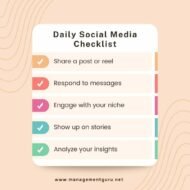
Planning social media content has become inevitable for all millenial marketers. Not just ordinary content but that which is well tailored to cater the needs of specific customer segments. Outline your goals and objectives – Before you begin planning your social media content, think about your overall objectives and goals. This will help you focus on the right content and ensure that each post serves a purpose. Learn about your target audience – Knowing your target audience will help you create content that will resonate with them and encourage engagement. Take some time to research the people who are following you and think about what kind of content they would be interested in. Create a content calendar – Creating a content calendar will help you stay organised and ensure that you are posting content on a consistent basis. This can be done manually or by using a scheduling tool to help you plan your posts ahead of time. Use analytics – Analyzing your performance will help you understand what types of content are working and which aren’t. Reviewing your analytics can help you improve your content strategy and make the most of your social media efforts. Keep an eye on your competitors – To stay ahead of the game, keep an eye on what your competitors are doing. You can use tools to track their social media activity and gain insights into what type of content resonates with their audience. Social Media Marketing Instagram Carousel Post by managementguru.net Objectives of Social Media Posting The goals of social media posting can vary depending on the goals of a business. The primary goals of social media posting are to engage customers, raise brand awareness, and drive website traffic. It can also be used to boost customer loyalty, generate leads, and cultivate relationships with industry influencers. All of these goals can be met by posting content that is relevant, interesting, and helpful to your target audience. How to Get to Know Your Social Media Audience Learning about your social media audience is key to creating successful content. Here are a few tips to help you get to know them: Take the time to learn about their interests. Consider what other topics they are interested in, who they follow, and what conversations they are involved in. Make inquiries! Inquire about your audience’s preferences for content and solicit feedback on what they find useful. Research! Examine your analytics to see who is engaging with your content and on what platforms they are doing so. Experiment with various types of content to see what works best for your audience. Engage with your fans! Thank them for their input and respond to their questions and feedback. By taking the time to get to know your social media audience, you can create content that is tailored to their interests and needs. How to Create a Content Calendar for Social Media Creating a content calendar for your social media accounts can be a great way to plan ahead and ensure that you are staying on top of your social media presence. Here are some tips to help you get started: Set goals and objectives – Before you begin creating a content calendar, you should have a clear idea of what you want to accomplish. Consider your social media goals and objectives, and how you can use content to help you achieve them. Identify your target audience – Knowing who you’re writing for will help you create content that speaks to them. Consider the types of content that will appeal to your target audience and the topics they want to hear about. Schedule your content – Once you’ve determined...
Posted by Managementguru in How to Blog, Marketing, SEO
on Dec 13th, 2022 | 0 comments

You have probably heard it said over and over again just how important it is to have a business website, even if you are not going to be selling any products or services online. You are told that it is a way to introduce your company, build your brand, and provide contact information where you can be reached to answer any questions a prospective customer might have. That is true, but there is one very important thing which probably hasn’t been made clear and that is the importance of having a blog on that website. In fact, that blog is probably more important than you may realize. Here are three reasons why. 1. Positions You as a Site of Authority Having a well-populated blog can position you as a site of authority and that is a key factor in ranking highly with Google. There is no secret to the key elements Google’s crawlers look for when ranking sites and one of the most important is in the information you are able to disseminate, placing you as an authority in your industry or niche. With user-friendly Content Management Systems like WordPress, you can even create your own blog posts to upload. While you can hire a content writing service, you may want to write some of your own posts. After all, who knows your industry better than you do? With a reliable Internet Service Provider and fiber services in ultra-fast speeds, you can quickly upload your content and then be on about what it is you do best, and that would be running your business. 2. Drives Traffic to Your Site Driving traffic to your website is important on a number of levels. Most importantly would be that this is exactly how consumers find the businesses they deal with. Long gone are the days of letting your fingers do the walking through the yellow pages and if you want to grow your business, you must be found! A blog is an important way of ranking highly for organic traffic in which SEO keywords are the driving force. When ranking within the first few results on page one of the SERPs, chances are excellent that users will click through to your blogposts. 3. Informative Blogs Build Trust in Your Brand Altogether too often consumers are left in the dark when it comes to products and services a company offers. Blog posts can provide a ton of information on the uses of products you carry. They also offer an opportunity to post content from business partnerships you have developed along the way. You can build off the trust those brands have built over time, and they can build off the trust you have earned. Whether or not you are going to sell any products and services online isn’t as important as being seen as an authority in your industry. As long as you provide information on where to find your storefront, you should be good to go. In the end, it’s all about telling the world who you are and what you have to offer. If you position yourself as an authority in your industry, they will listen and that’s the key to business...
Posted by Managementguru in How To, How to Blog, Social Media, Technology, Uncategorized, Video Marketing, Website Design
on May 29th, 2022 | 0 comments
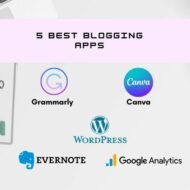
Gone are the days when managing your blog or website required you to sit in front of a computer. This is the mobile web’s era. The ease with which you may manage your blog on the road eliminates the need for a desktop computer. Mobile devices now perform on pace with traditional computing devices thanks to cutting-edge technology, software, and mobile apps. In this article, we’ll show you the top free blogging apps for iPhone, iPad & Android that you should download in 2022 if you want to maintain your blog on the move! Quick Note: The majority of the blogging applications included on this page are completely free to use. Some of them are premium apps with a freemium model (it means, you need to upgrade if you want better features or limits). 1. WordPress The WordPress app is one of the must-have blogging apps for iPhone and iPad because it is one of the most popular blogging platforms. Did you know that the WordPress platform powers approximately 35% of all websites on the internet? Yes, WordPress is the most popular CMS (Content Management System) in the world, with millions of users. If you too use the WordPress platform for your blog, the official WordPress app for iPhone and iPad is a must-have! 2021 Apple iPad Pro (32.77cm) 2022 Apple iPad Air (27.69cm) 2021 Apple 10.2-inch (25.91cm) However, the software runs significantly more smoothly on the iPhone than it does on the iPad. The following is a comprehensive list of everything you can accomplish using the official WordPress app: Write a new post, and save drafts which sync with the web version of WordPress blog.Add images and videos.Publish/Update blog posts and pages.Manage blog users, comments and plugins.Change themes.It supports the Gutenberg block editor. Quick note: You can publish content and engage with your audience from your smartphone if you’re using a self-hosted WordPress.org platform with a Jetpack-powered site. Here’s the link to WordPress app for iOSHere’s the link to WordPress app for Android app 2. Google Analytics You can’t evaluate a blog’s performance without knowing its traffic and user experience. What if you could get this info on your iPhone or iPad? It gets even better! The official Google Analytics iOS app is a godsend. On both devices, it runs quite smoothly. The following are some key metrics that may be tracked with this app: Real time visitorsTop landing pages by visitsOverview of traffic by channels – Organic, Paid, Direct, Social, Email and Referral.Overview of visitors by geographic location, new vs. returning, mobile device and web browser.Measurement of GoalsAverage page load time (in seconds) Google Analytics is a popular online analytics tool that Google provides. It monitors and reports your website traffic, providing you with information such as your best performing pages, total users, sessions, bounce rate, and more. Where can I download the Blogger app? Here’s the link to iOS app for Google AnalyticsHere’s the link to Google Analytics Android app 3. Evernote Evernote is the most popular note-taking app, with millions of users across the world using it to generate notes that can be text, drawings, images, or saved web pages. It has a free version with limited features, but you may upgrade to their premium editions for additional features such as increased storage capacity, offline access, and customer support. Why should you use Evernote as a blogger? You may save nearly anything in Evernote, including to-do lists, pictures, and images, as well as web pages and audio files. The most important reason to utilise Evernote as a blogger is that it can be used as a digital notebook to write and capture ideas whenever you want. Where can you download the Evernote...
Posted by Managementguru in How To, Marketing, SEO, Social Media, Strategy
on Nov 26th, 2021 | 0 comments

Digital marketing is an essential part of any business, but even more so for charities. This blog post will explore some ways you can use digital marketing to maximise your fundraising efforts by leveraging several effective digital marketing strategies. Who is your audience? Before you begin with anything else, you need to know who your audience is. What do they want? What questions do they have? How can your charity help them, and what will resonate most with their experience and needs? Once you know these things, then it’s just a matter of creating content that addresses those specific issues and concerns. Marketing agencies such as Eleven Marketing can be useful in this sense because they can help you get the most out of your budget to really reach the people you are trying to reach. This is useful because not only is budget often a constraint when it comes to raising awareness of your brand but spending your money in the most effective way possible can be difficult if you don’t know what you’re looking for. Get to the root of your cause It’s easy to think of reasons why you and your team should be passionate about your cause, but do those same people who will be donating share that passion? If not, then why should they care? What is it exactly about your cause that makes it something worth donating time and money to rather than another charity? Make sure you’re always asking yourself these questions so that you know what to focus your marketing efforts on. One of the best ways to leverage digital marketing is through storytelling. You can use storytelling in a variety of different ways – especially when it comes to getting fans involved with their favourite causes. You can also do this by leveraging influencers, sharing stories about people who donate, or by creating a story and sharing it. All of these methods can draw in your audience and create a closer connection between your charity and the people who support you. Positive social media engagement Social media is essentially an endless hive of buzzing activity. It’s also a place where your brand can be seen by potential donors and, more importantly, by those who already support you. The question is, how do you make the most use out of social media? What kind of content should you share that will actually get people engaged with your charity? One of the most popular ways for charities to use social media is by sharing positive or inspirational stories. People are much more likely to share positive content with others because it leads to them feeling good about themselves. If you can create a digital marketing strategy that aligns with this mindset, people are far more likely to share your information and spread the word about your cause. Build a useful website Another effective digital marketing strategy you can use is building a useful website that provides people with the information they need to know. It’s like having your own personal assistant that’s always available and ready to answer questions 24/7. So, what kind of content should you be sharing? It’s best to stick with articles about specific things people will be looking for when they visit your website. For example, if you’re a cancer charity, then you can post information about symptoms of cancer or how to find a specialist close...